

SpinFever Registration Steps For New Players
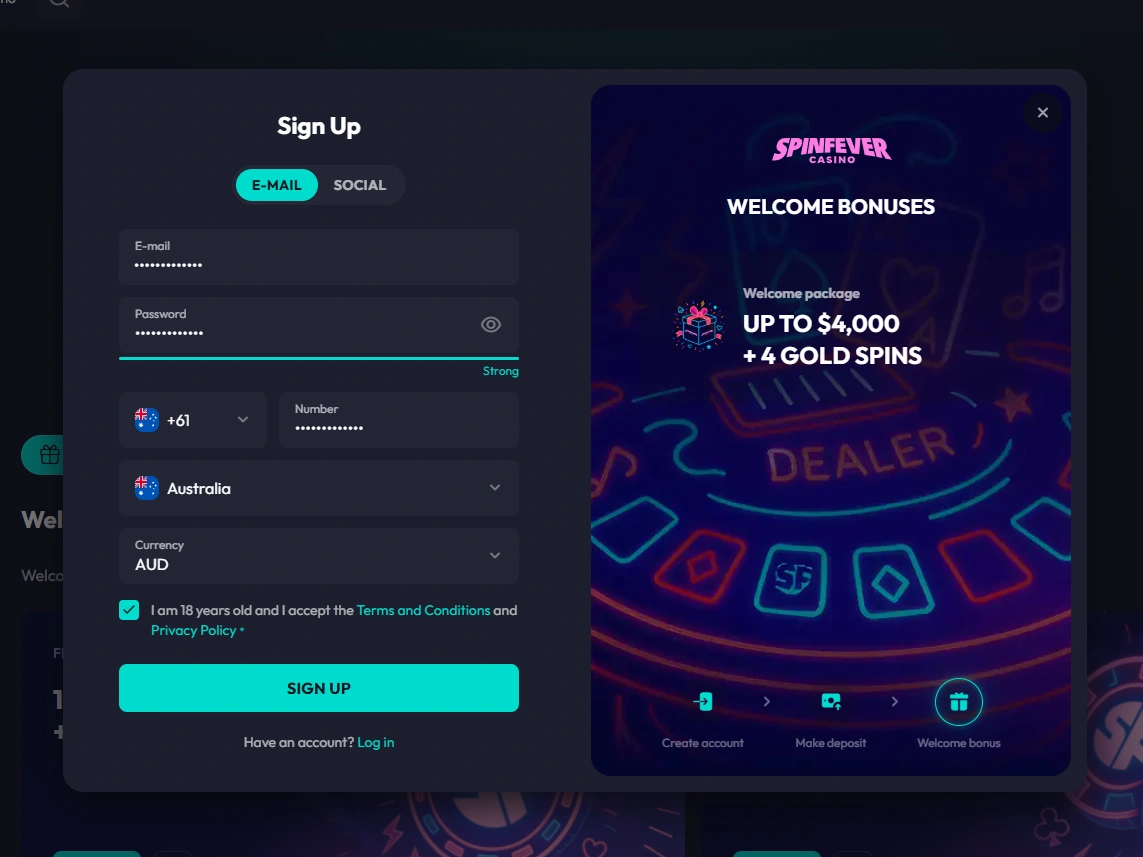
SpinFever offers email registration through a two-stage sign up form on the SpinFever online casino homepage. The form requests full name, date of birth, contact details and settings for country and currency. Consent includes age confirmation, acceptance of the Terms and Conditions and the Privacy Policy. Email confirmation relies on a link, with arrival recorded at 46 seconds, and no separate SMS step follows. Identity and payment verification may be required before withdrawal.
Enter your email, password and Australian phone number, confirm Australia and AUD, then select Sign Up.
Returning to SpinFever
Logging in to SpinFever requires the registered email address and matching password. Once signed in, players can move between profile settings, games, cashier and dashboard. If credentials are rejected or forgotten, check the registered email inbox for reset instructions.
Existing Player Login in Four Steps
Returning players sign in using their registered email address and password, then continue into their account.
Type your registered email address and matching password carefully.
Check the entered details, then submit or reset your password.
A successful login takes you to the next screen.
Restoring Access After a Forgotten Password
If you cannot log in, SpinFever password recovery may help using your registered email address. This process does not guarantee immediate access or a successful reset.
- Open the SpinFever login form and select the password recovery option.
- Enter your registered email address and submit the recovery request.
- Check your registered email inbox, including the spam folder if needed.
- Follow the reset instructions, set a new password and return to login.
KYC And Account Verification At SpinFever
Identity verification may be required before a withdrawal is processed, or when requested for security and regulatory checks. No fixed KYC review time is guaranteed, though withdrawal requests are targeted for processing within 72 hours after approval. A withdrawal can remain pending until required identity and payment checks are completed. KYC and internal approval can occur before the stated payment-processing period begins.
When KYC Checks Apply
Verification can be triggered by a withdrawal request, a security or regulatory review, a payment ownership check, or false, incomplete or inconsistent account information. Payment ownership checks relate to SpinFever banking options used for deposits and withdrawals. We note that these triggers are described as conditional, not applied to every account. Providing accurate legal name, date of birth, address and email details helps avoid account restrictions or withdrawal refusal.
Documents Needed For Verification
- Valid government-issued photo ID, such as a passport, driving licence or national ID;
- Proof of current address, such as a utility bill or bank statement;
- Additional documentation requested to confirm identity or payment ownership.
Registration And Verification Constraints At SpinFever
We reviewed the registration flow, login access and published verification rules to identify practical constraints for Australian players. The table below organises each issue, the supporting evidence and a cautious practical response.
| Review Finding | Evidence | Practical Response |
|---|---|---|
| Manual country and currency selection | Benchmark registration required manual selection of country and currency fields | Check these fields carefully before submitting the registration form |
| Late postcode validation | Postcode validation occurred only after the form was submitted | Confirm postcode accuracy before submission to avoid rework |
| No identity check at signup | No identity-document upload occurred during account creation in the benchmark flow | Prepare identification documents in advance for a later verification request |
| Non-guaranteed verification timing | No fixed KYC review time is guaranteed under published verification rules | Allow time for review before expecting a withdrawal decision |
| Payment ownership checks | Published rules confirm payment ownership may be checked alongside identity documents | Use a payment method that matches the registered account holder |
| Withdrawal held pending checks | A withdrawal can remain pending until identity and payment checks are completed | Submit accurate documents promptly if verification is requested |
Reducing Access Delays
The main constraint is that account creation does not confirm completed identity verification, and review timing is not fixed. Keeping registration details, address and payment method consistent may reduce follow-up requests. Inconsistent or incomplete information could require further checks and may extend withdrawal processing.